

Figma Plugin
Overview
The Styleframe Figma Plugin enables bidirectional synchronization of design tokens between your codebase and Figma. Export your Styleframe variables to Figma, or import Figma variables back into your codebase—all using the industry-standard W3C DTCG (Design Tokens Community Group) format.
Key features:
- Code-first architecture: Your Styleframe config is the single source of truth
- Bidirectional sync: Import tokens into Figma or export Figma variables to code
- Multi-mode support: Light, dark, and custom themes are preserved as Figma modes
- Type-safe: Colors, dimensions, strings, and booleans are mapped correctly
- Free and open source: No subscriptions or seat limits
Prerequisites
Before you begin, ensure you have:
- A Styleframe project with design tokens defined
- A Figma account (free or paid)
- Node.js 18+ installed (for CLI commands)
Installing the Figma Plugin
- Visit the Styleframe Sync plugin on the Figma Community
- Click "Open in..." and select your Figma file
- The plugin will appear in your Figma Plugins menu
Using the Figma Plugin
The plugin has two tabs: Import for bringing tokens into Figma, and Export for extracting Figma variables.
Importing Tokens into Figma
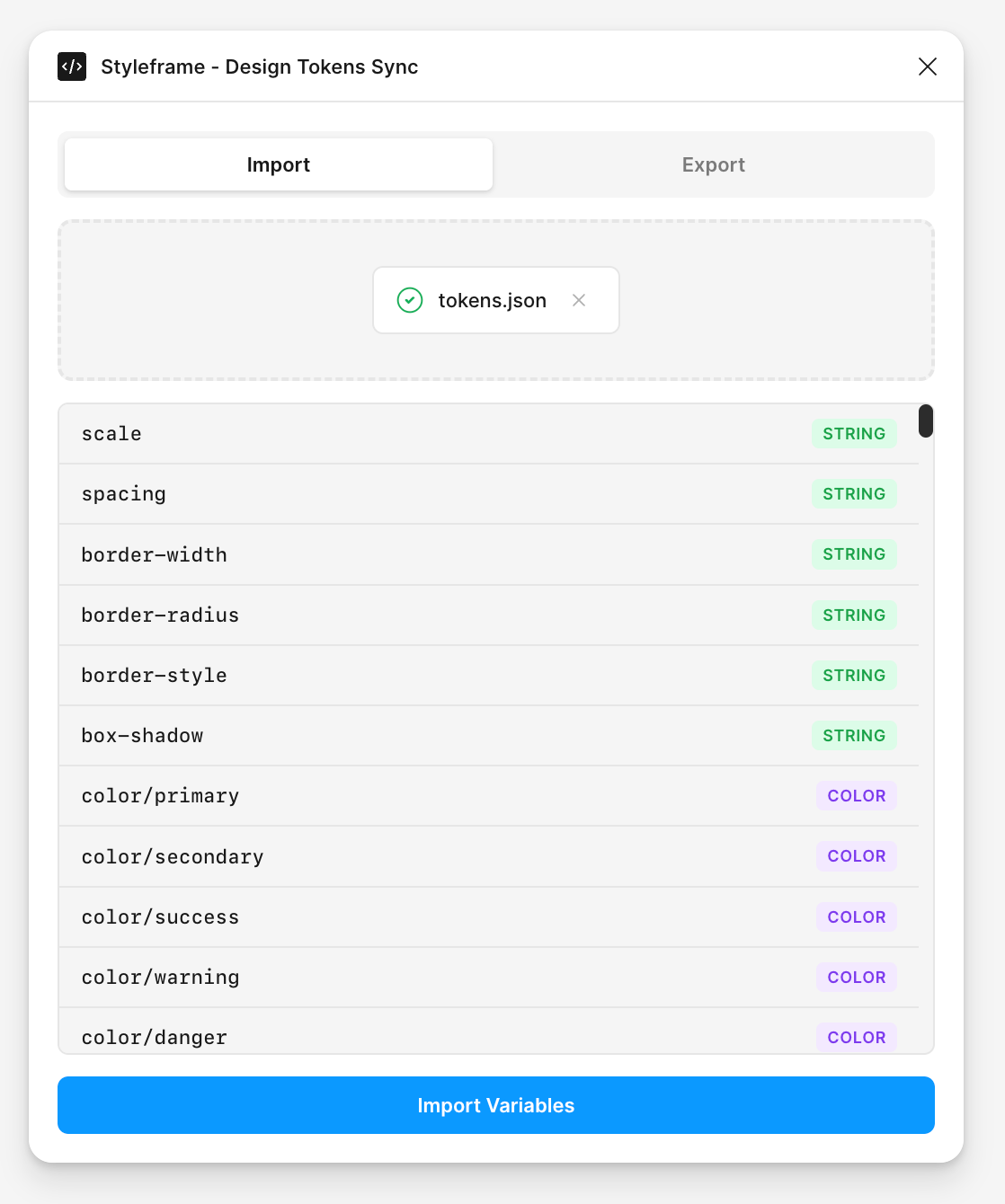
Import your Styleframe design tokens into Figma as native Figma Variables:
- Export your tokens using the CLI (see CLI Export below)
- Open the plugin in Figma and select the Import tab
- Drag and drop your
tokens.jsonfile into the drop zone (or click to browse) - Preview the variables that will be created
- Click Import to create the Figma variable collection
The plugin automatically:
- Creates a new variable collection with your tokens
- Sets up modes for each theme (Light, Dark, etc.)
- Maps token types to Figma variable types (Color, Number, String, Boolean)
- Preserves token aliases as Figma variable references
Exporting Tokens from Figma
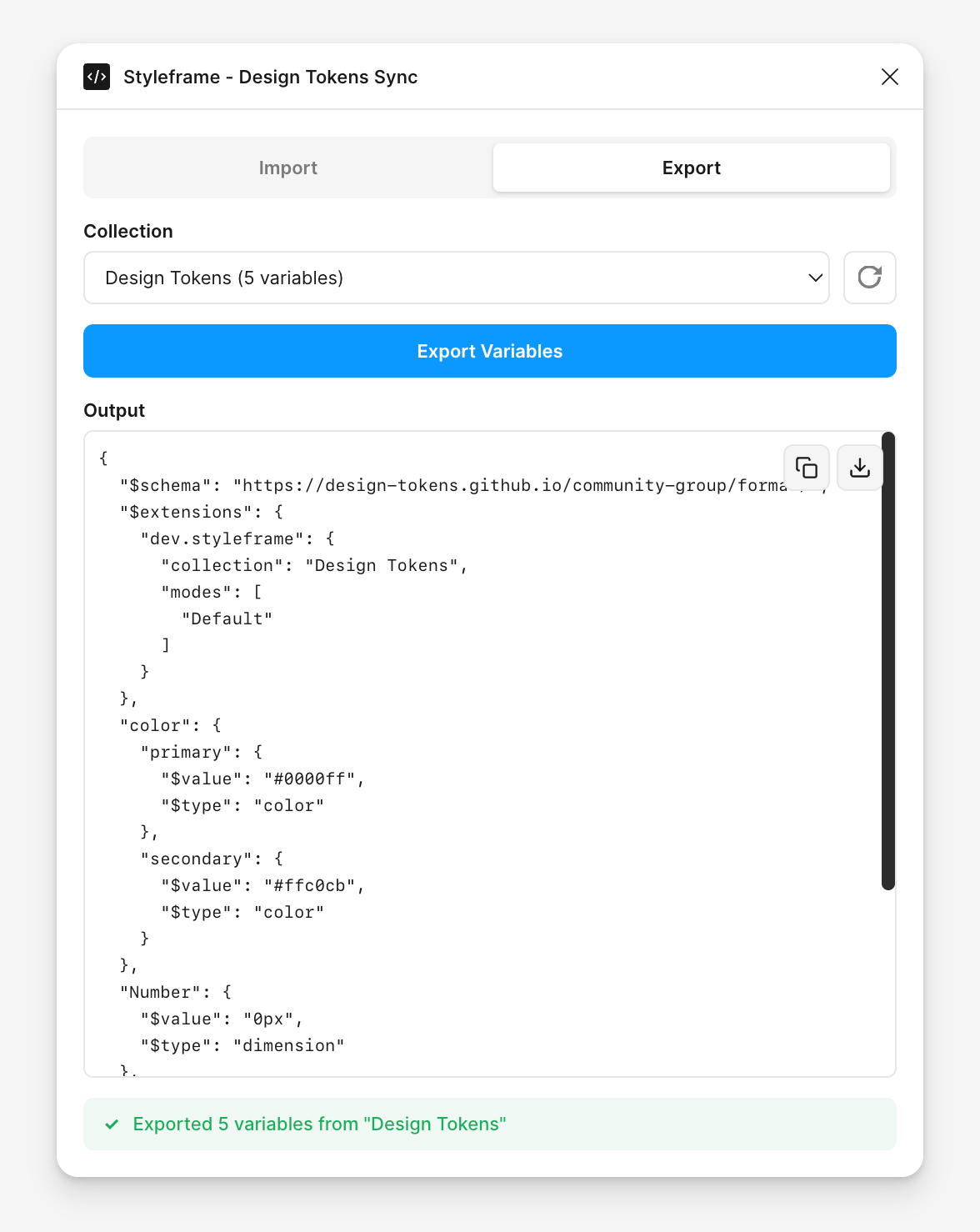
Export Figma Variables to the DTCG format for use in your codebase:
- Open the plugin and select the Export tab
- Select a collection from the dropdown menu
- Click Export to generate the DTCG JSON
- Copy the JSON to your clipboard or Download as a file
- Import into Styleframe using the CLI (see CLI Import below)
The export preserves:
- All variable values across modes
- Variable aliases as DTCG references (
{token.path}) - Token types and descriptions
- Hierarchical token structure
Using the CLI
The Styleframe CLI provides commands for automating token synchronization in your development workflow.
Exporting Tokens (Code → Figma)
Export your Styleframe variables to the DTCG format:
styleframe figma export [options]
| Option | Alias | Default | Description |
|---|---|---|---|
--config | -c | styleframe.config.ts | Path to Styleframe config file |
--output | -o | tokens.json | Output JSON file path |
--collection | -n | Design Tokens | Name for the Figma collection |
--baseFontSize | - | 16 | Base font size for rem conversion |
Example usage:
# Basic export
styleframe figma export

# Custom config and output
styleframe figma export -c src/styleframe.config.ts -o design-tokens.json

# Named collection
styleframe figma export --collection "My Design System"
Sample output:
Loading configuration from "styleframe.config.ts"...
Extracting variables...
Writing 42 variables to "tokens.json"...
Exported 42 variables in DTCG format
Importing Tokens (Figma → Code)
Generate Styleframe TypeScript code from a DTCG JSON file:
styleframe figma import --input <file> [options]
| Option | Alias | Default | Description |
|---|---|---|---|
--input | -i | required | Input DTCG JSON file path |
--output | -o | tokens.styleframe.ts | Output TypeScript file path |
--composables | - | true | Use @styleframe/theme composables |
--rem | - | false | Use rem units for dimensions |
--baseFontSize | - | 16 | Base font size for rem conversion |
--instanceName | - | s | Styleframe instance variable name |
Example usage:
# Basic import
styleframe figma import -i tokens.json

# Custom output path
styleframe figma import -i tokens.json -o src/theme/tokens.ts

# With rem units
styleframe figma import -i tokens.json --rem --baseFontSize 16

# Without composables (plain variables)
styleframe figma import -i tokens.json --composables false
Generated code example:
import { styleframe } from "styleframe";
import { useColor, useSpacing } from "@styleframe/theme";

const s = styleframe();
const { variable, ref, theme } = s;

// Color variables
const { colorPrimary, colorSecondary } = useColor(s, {
  primary: "#006cff",
  secondary: "#6c757d",
});

// Spacing variables
const { spacingSm, spacingMd, spacingLg } = useSpacing(s, {
  sm: "8px",
  md: "16px",
  lg: "24px",
});

theme("dark", (ctx) => {
  ctx.variable(colorPrimary, "#60a5fa");
  ctx.variable(colorSecondary, "#9ca3af");
});

export default s;
Recommended Workflow
Here's a typical workflow for syncing tokens between Styleframe and Figma:
1. Define tokens in Styleframe
// styleframe.config.ts
import { styleframe } from 'styleframe';

const s = styleframe();
const { variable, theme, ref } = s;

const colorPrimary = variable('color.primary', '#006cff');
const colorBackground = variable('color.background', '#ffffff');
const spacingMd = variable('spacing.md', '16px');

theme('dark', (ctx) => {
  ctx.variable(colorPrimary, '#60a5fa');
  ctx.variable(colorBackground, '#1a1a1a');
});

export default s;
2. Export to DTCG format
styleframe figma export -o tokens.json
3. Import into Figma
- Open the Styleframe Sync plugin in Figma
- Drag
tokens.jsoninto the Import tab - Click Import
4. Design in Figma
Use your variables in Figma as needed for components, styles, and layouts.
DTCG Format
Styleframe uses the W3C Design Tokens Community Group (DTCG) format for token interchange. This is an emerging standard supported by many design tools.
Example DTCG structure:
{
  "$schema": "https://design-tokens.github.io/community-group/format/",
  "$extensions": {
    "dev.styleframe": {
      "collection": "Design Tokens",
      "modes": ["Light", "Dark"]
    }
  },
  "color": {
    "primary": {
      "$value": "#006cff",
      "$type": "color"
    },
    "background": {
      "$value": "#ffffff",
      "$type": "color"
    }
  },
  "$modifiers": {
    "theme": {
      "$type": "modifier",
      "contexts": {
        "Dark": {
          "color": {
            "primary": { "$value": "#60a5fa" },
            "background": { "$value": "#1a1a1a" }
          }
        }
      }
    }
  }
}
Best Practices
- Keep code as the source of truth: Define tokens in Styleframe first, then sync to Figma
- Use semantic token names:
color.primaryinstead ofcolor.blue - Organize with groups: Use dot notation (
color.background.primary) for hierarchy - Export tokens in CI/CD: Automate
styleframe figma exporton every commit to generate fresh token files
FAQ
Styleframe supports four token types that map to Figma variable types:
- Color: CSS color values (hex, rgb, hsl, etc.) → Figma Color
- Number/Dimension: Numeric values with units (16px, 1rem) → Figma Number
- String: Text values → Figma String
- Boolean: true/false values → Figma Boolean
ref() are converted to DTCG alias syntax ({token.path}). When imported into Figma, these become native Figma variable references. The same applies in reverse when exporting from Figma.styleframe figma export to your build pipeline to generate fresh token files on every commit. Note that Figma's Variables REST API for programmatically importing tokens is only available to Enterprise organization members. For other plans, you'll need to use the plugin manually to import the generated JSON.